
A typical call center situation: A subscriber calls the company; an operator answers; the call is interrupted for some reason (perhaps the subscriber needs to do something and then call back), and oh my! The subscriber calls back and is connected to a completely different operator, to whom they have to explain everything all over again. It would seem such a typical task to ensure that the subscriber always gets the same operator after calling back. But why isn’t there a solution to this problem in the stock package or even among the paid modules?
«No, come on!» I thought, and decided to make a kind of prosthesis to cover this deficiency.
You can throw your shoes at me, but I’ll stick with my beloved PHP. Especially since it’s always available on a FreePBX server! Incidentally, I found a practically ready-made solution online, but I didn’t understand a thing about how it worked and couldn’t use it. :)) I think this article will be useful for those who’ve fallen into similar traps.
The first thing we need to do is find the directory where Asterisk’s AGI scripts are located. This could be /var/lib/asterisk/agi-bin/ or, like on my home server, /usr/share/asterisk/agi-bin/ . Basically, you need to look for agi-bin. Create a script in this folder, for example , mymanager.php , and paste the following contents into it:
 <pre class="wp-block-syntaxhighlighter-code">#!/usr/bin/php -q
<?php
$prio = true; // Приоритет исходящих от операторов звонков (true|false)
$interval = 24; // Период, после которого фиксация абонента за определённым менеджером будет снята (в часах)
$timeout = 15; // Сколько секунд абоненту ждать ответа оператора?
$queue = 199; // Номер очереди, куда нужно вернуть абонента, если звонок на его оператора не удался.

// Подготавливаем PDO и подключаемся к базе
	$user = 'freepbxuser';
	$pass = 'Пароль юзера базы'; // Настройки базы обычно лежат в /etc/freepbx.conf. Копируем их оттуда.

	$dsn = "mysql:host=localhost;dbname=asteriskcdrdb;charset=utf8";
	$opt = [
		PDO::ATTR_ERRMODE            => PDO::ERRMODE_EXCEPTION,
		PDO::ATTR_DEFAULT_FETCH_MODE => PDO::FETCH_ASSOC,
		PDO::ATTR_EMULATE_PREPARES   => false,
	];
	try {$pdo = new PDO($dsn, $user, $pass, $opt);} catch (PDOException $e) { die('DB connection failed: ' . $e->getMessage());}

require('phpagi.php'); // Цепляем класс работы с AGI. Он есть в папке agi-bin "из коробки"
$agi = new AGI();
$cid = $agi->request['agi_callerid'];

if(strlen($cid) > 8){ // на всякий случай, проверяем, что за звонок к нам прилетел. Внешние, по идее, не могут быть короче 9 символов.
	 $cid = $agi->request['agi_callerid']; // забираем CID звонящего
	 // Ищем в базе CDR, не звонил ли нам этот номер ранее, но не позднее указанного в настройках интервала. Нас интересуют состоявшиеся звонки, длительностью не короче 5 секунд (можно увеличить).
	 $stmt = $pdo->prepare('select dst from cdr where calldate > now() - interval ? hour and cnum = ? and disposition="ANSWERED" and duration > 5 and lastapp = "Dial" and dcontext = "ext-local" order by `calldate` desc limit 1');
	 $stmt->execute(Array($interval,$cid));
	 if($row = $stmt->fetch()){
		$operator = $row['dst'];
	 } else {
		 $prio = true;
	 }
	 // А теперь проверяем, не звонил ли сам оператор на этот номер? В настройке выше можно включить или выключить приоритет полученных из исходящих звонков данных
	 if($prio == true){
		 $stmt = $pdo->prepare('select cnum from cdr where calldate > now() - interval ? hour and dst = ?  and lastapp = "Dial" order by `calldate` desc limit 1;');
		 $stmt->execute(Array($interval,$cid));
		 if($row = $stmt->fetch()){
			if($row['cnum'] > 0){
				$operator = $row['cnum'];
			}
		 }
	 }
	// Если мы получили номер какого-либо оператора - пытаемся его вызвать.
	 if($operator > 0){
		$agi->exec('Dial',"Local/".$operator."@from-internal,".$timeout.",g");
	 }
	 // Если ничего не получилось, или если оператор сам сбросил звонок, либо по заранее указанному таймауту, передаём звонок в заранее указанную очередь к другим операторам.
	 $dialstatus = $agi->get_variable('DIALSTATUS');
	if ( $dialstatus != 'ANSWERED' ) {
	   $agi->exec('Goto',"ext-queues,".$queue.",1");
	}
}
// Говорим астериску, что всё норм и скрипт выполнился без ошибок.
exit(0);
?>
</pre>
We’ll pass this script to the asterisk user and group with read and execute permissions. Now we need to connect it to our PBX.
If you don’t have the Misc Destinations module installed, install it in the Module Admin section.
Go to Applications > Misc Destinations and add a new destination. Enter whatever you want in the name, and in the Dial field, enter a free destination number that will be used later in the context. Let’s say I’ll use 96.
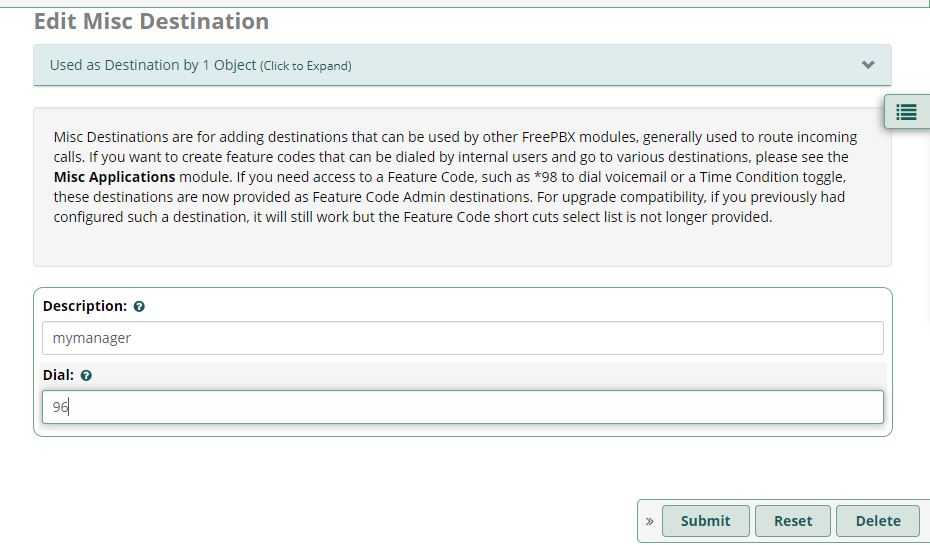
Now we need to open the file /etc/asterisk/extensions_custom.conf and add the following there:
 [from-internal]
exten => 96,1,Noop(Running miscapp 1: mymanager)
exten => 96,n,AGI(mymanager.php, ${CALLERID(number)})
exten => 96,n,Hangup()
Save, wait for the Apply Config button, test, and toast the admin with a bottle of beer. ;)