SMS is becoming less and less used as a means of communication these days. However, it has become a very popular tool for identification and two-factor authentication. If you have a large volume of outgoing messages, a dedicated gateway with a single SIM card won’t cut it. However, for personal use, you can use your own SIM card with a cheap SMS package. I’ll show you how to do this as easily as possible, using a Mikrotik with LTE and a minimal web server with PHP support.
I already have a Mikrotik LTaP mini kit, which provides me with a backup channel, so I only needed to purchase an SMS package. And no, sending SMS doesn’t interfere with my SIM card’s data connection. ;)
The first thing you’ll need is a PHP class for working with the Routeros API. You can get it here .
We drop the class into the required directory on the web server and create a sending script nearby.
vi sendtest.php
 <pre class="wp-block-syntaxhighlighter-code"><?php

require('routeros_api.class.php');

$API = new RouterosAPI();

$API->debug = false;

if ($API->connect('адрес_роутера', 'логин_для_mikrotik', 'пароль')) {

   $ARRAY = $API->comm("/tool/sms/send", array(
		"message"=> "Test message",
		"phone-number" => "+99899XXXXXXX",

   ));

   print_r($ARRAY);

   $API->disconnect();
}

?></pre>
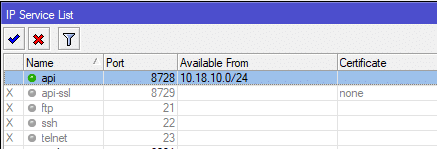
On the router side, you need to enable access to the API.
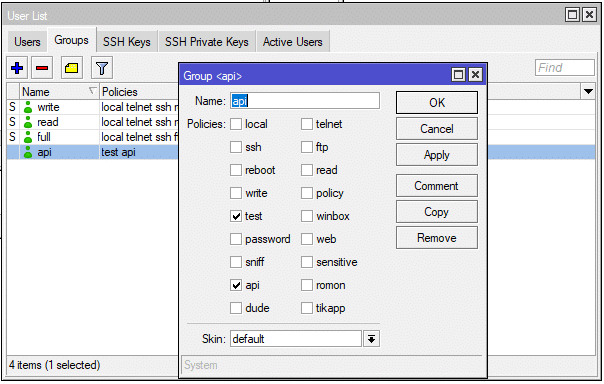
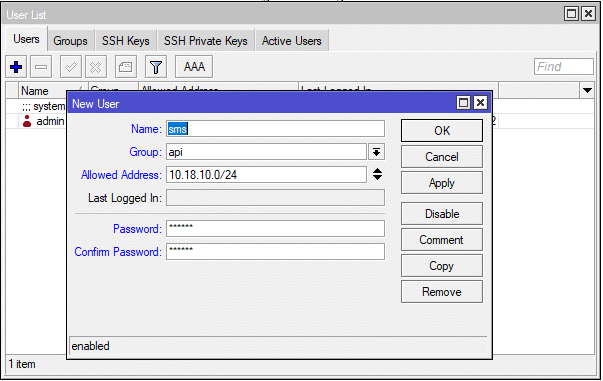
Let’s create a group and user for the API with a minimum set of permissions