
If you have a Chinese DVR at home or in the office, you’ve probably experienced this. The official client looks like it hasn’t been updated since 2012, only runs on Windows, and you need another app for the intercom. I got fed up with this, so I coded my own app: eXUnity Observer .
The source code is open on GitHub: github.com/ibuben/observer , and ready-to-use builds for Windows and Linux are on the releases page .
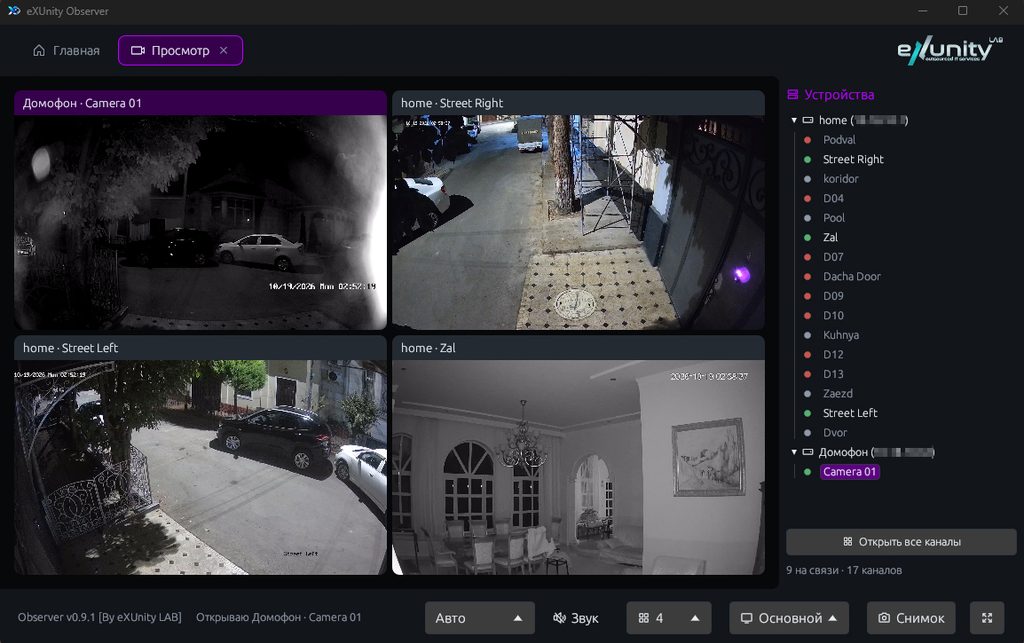
What can it do?
Live video
- Grid of 1, 4, 9, 16, 25, 36, or 64 cameras. Cameras can be rearranged by dragging.
- Any camera can be expanded to fill the entire window or full screen.
- The main stream provides full quality, while the additional stream saves network and processor resources when there are many cameras on the screen.
- Sound from Xiongmai cameras is turned on with one button on the desired cell.
- PTZ cameras can be controlled using a PTZ joystick directly over the image, zooming and speed adjustment.
- A photo is taken in one click.
- H.264 and H.265 hardware decoding: on Windows via D3D11, on Linux via VA-API, VDPAU, or CUDA. If the video card fails, the camera automatically switches to the CPU.
Archive
- Search for records on the recorder disk for a selected period, up to 48 hours at a time.
- Playback at 1x, 2x, 4x, 8x and 16x speed.
- Download the fragment directly to MP4 with sound , rather than to a proprietary format that requires a separate player.
Logbook and Configurator (XM only)
- Event log of the recorder: alarms, motion detection, line crossing, zone intrusion, and others.
- The configurator, which contains almost all DVR settings: channels, detection, recording schedule, image, network, disks, users, and maintenance, including rebooting and formatting. The program asks for confirmation before performing any dangerous actions.
Hikvision intercom
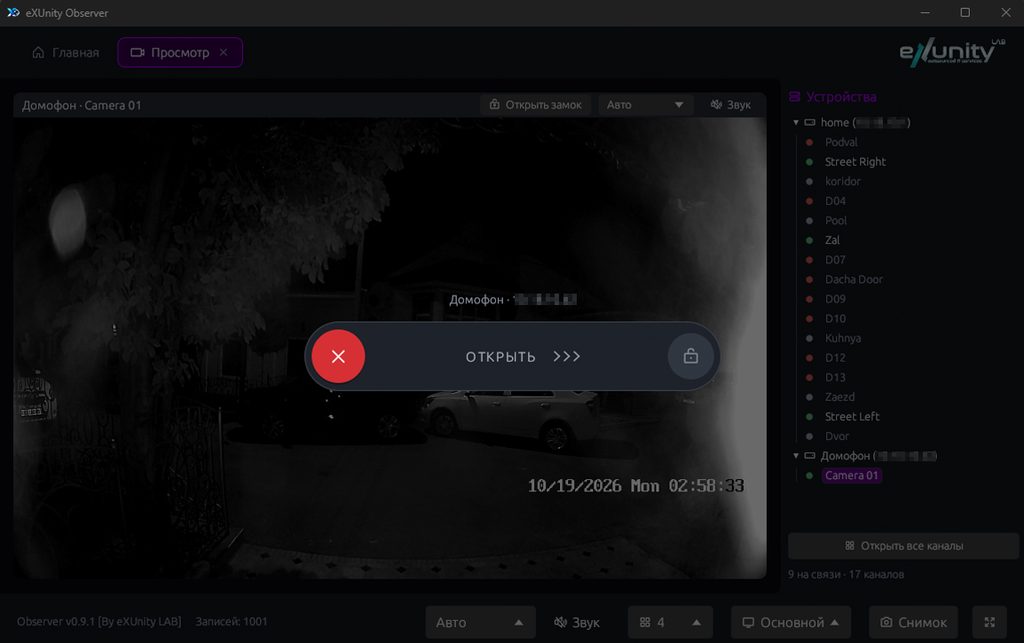
When a call is made to the Hikvision intercom, the app displays the incoming call along with a live image from the selected camera. The lock opens with a swipe right in the app window, eliminating the need for a separate app.
What is supported
| Xiongmai (XM) | Hikvision | |
|---|---|---|
| Live video | ✓ | ✓ |
| Sound | ✓ | ✓ |
| PTZ | ✓ | — |
| Archive and download in MP4 | ✓ | ✓ |
| Event log | ✓ | Not yet |
| Configurator | ✓ | Not yet |
| Intercom: bell and lock opening | — | ✓ |
Xiongmai produces components for a huge number of dashcams and cameras sold under dozens of brands. If your dashcam opens via CMS, XMeye, or iCSee and listens on the EX102 port, it will most likely work.
You can connect either via a local network or a public IP address. The manufacturer’s cloud services are not required.
How it works
The program is written in Rust . The interface is built on egui , a fast library that looks the same on all systems.
- The program communicates directly with Xiongmai recorders via their own binary protocol (Sofia), without the manufacturer’s SDK or third-party libraries.
- With Hikvision it works via RTSP for video and ISAPI for intercom.
- ffmpeg unpacks the video: the program transfers the stream from the recorder to it and extracts the finished frames.
Thanks to this, the program is lightweight: the archive weighs about 5 MB on Windows and 9 MB on Linux, it does not require installation, and the settings are stored in a single file next to it.
The kit also includes a console utility, xm-nvr. It allows you to find out the dashcam’s model and firmware, search for recordings, or save video to a file, for example, from a scheduled script:
xm-nvr search --host 192.168.1.10 --channel 1 \
    --start "2026-10-06 00:00:00" --end "2026-10-06 23:59:59"
How to install
Windows 10/11. Download observer-v1.2.0-windows-x64.zip from the releases page and unzip it. Place ffmpeg in C:\ffmpeg\ and run xm-view.exe.
Linux (Ubuntu 20.04 and later, Debian 11 and later, and other distributions with glibc 2.31+):
sudo apt install ffmpeg
tar xzf observer-v1.2.0-linux-x64.tar.gz
cd observer-v1.2.0-linux-x64
./xm-view
If you want to build the program yourself, detailed instructions for Windows, Ubuntu, Fedora, and Arch are in the README .
What’s next?
We’re planning a log and PTZ module for Hikvision, and possibly Dahua support. If the program doesn’t work with your recorder or you’re missing a feature, please submit an issue on GitHub. If you find the program useful, please give the repository a ⭐ star, or even better, a donation . :)